Applications · Built by Infinite Nerds

Security software,
built by practitioners.

We build the tools we wish we'd had on client engagements: focused desktop applications that answer real security questions, run on your own computers, and keep your data there.

01 /

The applications

Mac & Windows
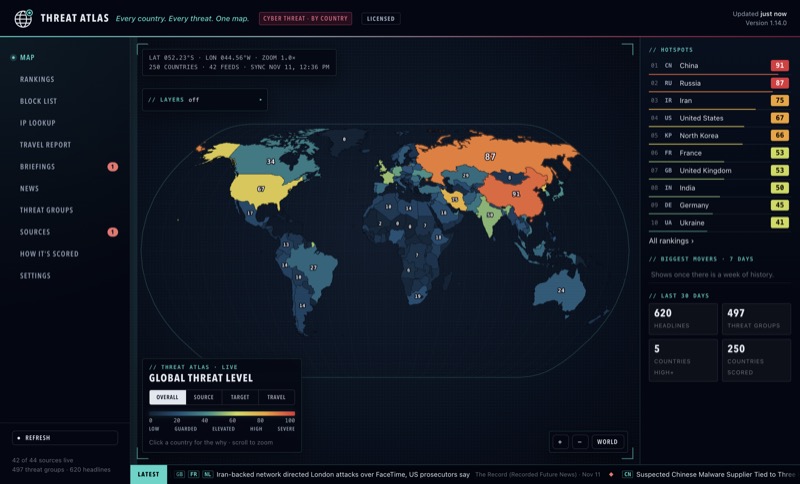
Threat Atlas world map with every country colored by threat score
Threat intelligence · Available now
Threat Atlas

Every country scored 0–100 on cyber-threat activity from public intelligence, then turned into firewall block lists, traveler briefings and a daily read on what changed.

  • Country scores with the evidence behind each one
  • Block lists ready for your firewall
  • Travel reports, trip register and debriefs
Explore Threat Atlas →
In development
More on the way.

Five more of the tools we use on engagements are being prepared for release: Active Directory administration, SQL performance, endpoint inventory, network checks and zero-day tracking. Each is built to the same security standard as Threat Atlas.

See What's Coming ↓
02 /

More on the way

In development

These applications are in development. Each one will get its own page with details and screenshots when it's ready. Want to hear first? Ask to be told when one launches.

AD Tools iconScreenshots coming soon
Identity · In development
AD Tools

Active Directory and Microsoft 365 administration and reporting, for commercial and GCC High tenants: user lifecycle, bulk changes, scheduled reports and a tamper-evident audit log.

Tell Me When It Launches →
SQL Reaper iconScreenshots coming soon
Performance · In development
SQL Reaper

See how a remote office really reaches your SQL Server: internet quality, the link back to headquarters and database speed, each graded A to F.

Tell Me When It Launches →
RMM iconScreenshots coming soon
Endpoints · In development
RMM

Remote monitoring for Windows and Mac: a server console and lightweight agents that keep a live inventory of every computer's hardware and software.

Tell Me When It Launches →
Network Tools iconScreenshots coming soon
Networks · In development
Network Tools

Network, DNS, email and security checks in one place, run from your own computer, with every result saved for later.

Tell Me When It Launches →
Zero-Day iconScreenshots coming soon
Vulnerabilities · In development
Zero-Day

A daily brief of newly exploited vulnerabilities, matched against the software your organization actually runs.

Tell Me When It Launches →
03 /

Built for commercial and GCC High

Two clouds, one standard

Most security tools are written for commercial Microsoft 365 and break the moment they meet a government tenant. We build for both from day one, because the defense contractors we support run on GCC High, and several of these tools were first put to work there.

Commercial & GCC
Microsoft 365 commercial

The everyday Microsoft cloud, including GCC for state and local government.

Sign-in
login.microsoftonline.com
Microsoft Graph
graph.microsoft.com
Exchange Online
outlook.office365.com
GCC High & DoD
Microsoft 365 US Government

The sovereign cloud for CUI and ITAR data, with its own addresses, identities and rules.

Sign-in
login.microsoftonline.us
Microsoft Graph
graph.microsoft.us
Exchange Online
outlook.office365.us

AD Tools manages Active Directory and Microsoft 365 in either cloud through Microsoft Graph, and every application that signs your staff in with Entra ID works in both.

The effort behind it

/ 01
The right cloud, every time
AD Tools, SQL Reaper and RMM ask Microsoft which cloud a tenant lives in and use that cloud's addresses. A GCC High tenant is never sent to a commercial endpoint, and a mismatch stops with a clear message.
/ 02
Sign-ins we verify ourselves
Every Entra ID sign-in token is checked by the application itself: its signature against the tenant's published keys, who issued it, who it's for, and when it expires.
/ 03
Nothing outside your boundary
The apps run on your computers and servers. Your tenant data, settings and reports don't pass through an Infinite Nerds cloud, so the tools fit inside the boundary you already defend.
/ 04
Ready for isolated enclaves
Licenses activate by file for computers that can't reach the internet, and a missed license check never locks anyone out.

GCC High support covers the applications' own sign-in and Microsoft 365 connections. It isn't a FedRAMP authorization or a CMMC certification; those apply to your environment, and we can help you get there.

04 /

How we build them

The same rules, every app

Every Infinite Nerds application shares one foundation for licensing, updates and data handling. It's designed the way we'd want any vendor's software to be: local first, encrypted in transit, signed end to end, and honest about where its data comes from.

/ 01
Your data stays on your computers

The apps run locally. Your settings, findings and reports aren't uploaded to an Infinite Nerds cloud.

/ 02
We see only the license

Licensing sends a license ID, a one-way computer hash, the computer's name and the app version. Nothing about your environment.

/ 03
Encrypted in transit

HTTPS for every connection, and TLS 1.2 or newer on our own services.

/ 04
Secrets in the OS vault

API keys are encrypted with the macOS Keychain or Windows data protection, never stored in plain text.

/ 05
Signed licenses and updates

Licenses, activations and release manifests are digitally signed, and every installer is fingerprint-checked before it opens.

/ 06
Works offline when it must

Activation by file supports isolated networks, and a missed license check never locks anyone out.

Want to see one in action?

Book a Walkthrough →